Overseer
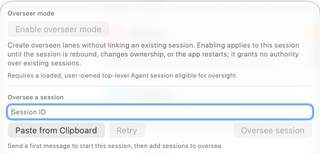
The oversight control sits between Workflow and Interview above the message editor. Open it to manage the current session's relationships with other Agent sessions, including sessions in other RepoPrompt windows. The screenshot shows the control's earlier branching-symbol appearance; newer builds use oversight role marks and counts.
Start with a loaded session
Send a first message so the session exists and is loaded. A blank composer can display Send a first message to start this session, then add sessions to oversee. Overseer activation requires an eligible, user-owned top-level Agent session. When the session is unavailable or ineligible, the popover explains why its controls are disabled.
Enable overseer mode lets the session create managed lanes without first linking an existing conversation. Enabling it grants no access to unrelated sessions. The activation applies to this session until it is rebound, changes ownership, or the app restarts.
Add an existing session
Copy the target's session ID from its sidebar controls, enter it under Oversee a session, or choose Paste from Clipboard. Check the preview and choose Oversee session. The confirmation explains what the overseer will be allowed to read and control. Choose Retry if a session has just become available and the candidate information needs refreshing.
This relationship can allow the overseer to read status and conversations, send instructions, steer or stop work, answer questions and applicable one-time approval requests, compact context, and receive updates. Treat the confirmation as a delegation decision.
Read and manage relationships
The popover lists sessions this agent oversees and sessions overseeing it. Role marks and counts help distinguish the two directions. Open a linked session to inspect its work; Unlink removes the relationship without deleting the conversation. Automatic wake controls decide when updates can start follow-up work and therefore affect model usage.
For the full feature, continue with Overseer Mode Overview, Lanes, Linking Sessions, and Best Practices.