Workflow Templates
A workflow template gives the agent a method for handling your request. You provide the task; the template supplies instructions about research, planning, delegation, implementation, or review. Choose a workflow when you want that structure without writing the full procedure yourself.
Choose from the welcome screen
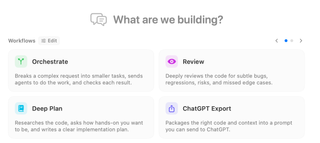
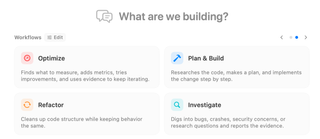
On an empty session, select a card under What are we building?. The selected card prepares the next message and focuses the editor. Selecting it again clears that choice. Use the arrows or page dots to browse more cards; the cards reflect your visible workflows and featured choices.
Choose from the Workflow selector
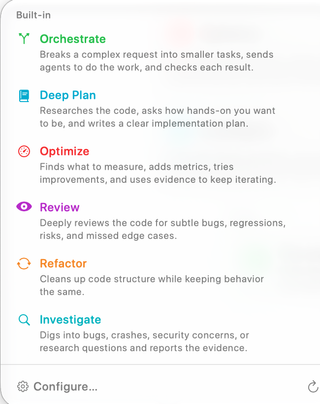
Open the lightning-bolt Workflow control above the editor. This selector offers the workflow catalog while you compose, including custom workflows you have added. The name and short description help you choose a method before sending. Configure… and the welcome screen's Edit control open workflow configuration; the refresh control reloads the available definitions.
| Template | What it asks the agent to do |
|---|---|
| Orchestrate | Break a complex request into tasks, delegate work, and check the results. |
| Deep Plan | Research the code, establish how involved you want to be, and produce a detailed implementation plan. |
| Optimize | Establish measurements, instrument the relevant behavior, and iterate using evidence. |
| Plan & Build | Research the request, plan the change, and implement it step by step. |
| Review | Examine code for bugs, regressions, risks, and missed edge cases. |
| Refactor | Improve code structure while preserving its intended behavior. |
| Investigate | Research a bug, crash, security concern, or question and report supporting evidence. |
| ChatGPT Export | Assemble code and context into a prompt you can take to ChatGPT. |
The list depends on visibility settings; a hidden built-in template remains configurable. See Agent Workflows settings to show, hide, feature, reorder, or clone templates and create custom Markdown workflows.
Send the request through the template
Select the template, then write a specific request: “Review the checkout changes for cancellation bugs; focus on session cleanup” is more useful than “Review.” Choose the execution location, check the model and permissions, and send. RepoPrompt wraps the message in the selected template and clears the selection after accepting the submission. Select another template when a later message needs a different method.
Templates are instructions to an agent, so the actual work depends on the task, connected models, tools, and permissions. Selecting Orchestrate does not itself start other sessions, and selecting Review does not grant additional repository access.
These Agent Mode templates are configured separately from Copy/Chat Workflow Presets and external Skills & Slash Commands. For longer explanations of built-in procedures, see Agent Mode Workflow Commands.