Advanced
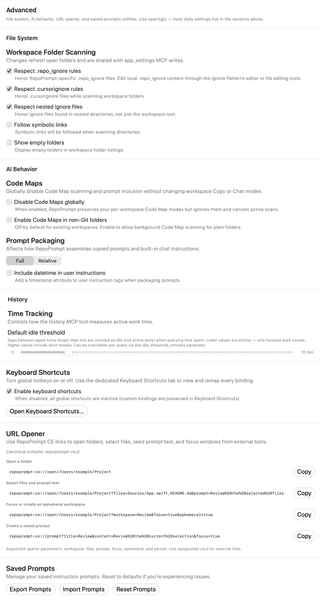
Configure workspace folder scanning, ignore rules, symbolic links, Code Maps, prompt packaging, history time tracking, keyboard-shortcut availability, URL opening, and saved-prompt utilities.
Open Settings → General → Advanced. The screenshot shows example values. These controls combine app-wide preferences with prompt-editor options and one-time utilities.
Workspace Folder Scanning
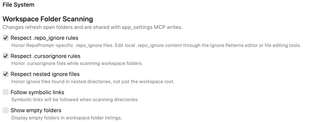
Changes refresh open folders and use the same preferences as the app_settings MCP tool.
| Control | Effect |
|---|---|
| Respect .repo_ignore rules | Honors RepoPrompt-specific ignore files. Edit their contents in the Ignore Patterns editor or with file-editing tools. |
| Respect .cursorignore rules | Honors .cursorignore files during scans. |
| Respect nested ignore files | Reads ignore files in nested directories as well as the workspace root. |
| Follow symbolic links | Follows symbolic links while scanning directories. |
| Show empty folders | Includes empty folders in workspace folder listings. |
These switches control scanning behavior; they do not edit your ignore files.
Code Maps
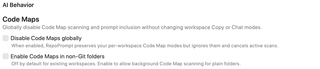
Disable Code Maps globally stops Code Map scanning and prompt inclusion, cancels active scans, and temporarily ignores saved workspace Copy and Chat Code Map modes. Those modes are preserved and take effect again when you turn the global disable switch off.
Enable Code Maps in non-Git folders permits background Code Map scanning for plain folders. It is off by default for existing workspaces. It does not override a global Code Maps disable setting.
Prompt Packaging

Full and Relative choose how file paths appear in packaged prompts. Include datetime in user instructions adds a timestamp attribute to the user-instruction tags. These controls affect copied prompts and built-in chat instructions; they do not rename files.
History time tracking
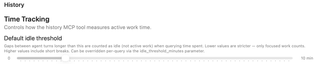
Default idle threshold controls the history MCP tool's active-work calculation. Gaps between agent turns longer than the threshold count as idle rather than active work.
The range is 0–60 minutes, in one-minute steps; the default is 10 minutes. Lower values count only more tightly spaced work, while higher values include short breaks. A query can override the setting with idle_threshold_minutes. This changes the calculation, not the underlying session history.
Keyboard Shortcuts

Enable keyboard shortcuts is the same master switch used on the Keyboard Shortcuts page. Turning it off leaves custom bindings saved. Open Keyboard Shortcuts… opens the complete binding editor for this window.
URL Opener
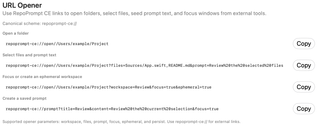
Use the repoprompt-ce:// scheme for links from external tools. The page's Copy buttons copy examples so you can replace the sample paths and URL-encode your text.
repoprompt-ce://open//Users/example/Project
repoprompt-ce://open//Users/example/Project?files=Sources/App.swift,README.md&prompt=Review%20the%20selected%20files
repoprompt-ce://open//Users/example/Project?workspace=Review&focus=true&ephemeral=true
repoprompt-ce://prompt?title=Review&content=Review%20the%20current%20selection&focus=true
The opener supports workspace, files, prompt, focus, ephemeral, and persist parameters. The examples respectively open a folder, select files and seed instructions, focus or create an ephemeral workspace, and create a saved prompt. Copying an example does not execute it.
Saved Prompts

- Export Prompts writes saved prompts to a JSON file you choose, with
SavedPrompts.jsonsuggested as the filename. - Import Prompts reads a JSON file and adds imported prompts, reporting how many were added.
- Reset Prompts asks for confirmation, removes custom prompts, and restores the defaults. This action cannot be undone through the reset dialog; export first if you want a backup.