Custom API
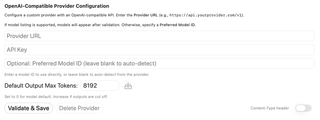
Add and manage custom OpenAI-compatible API endpoints, their authentication, and the models offered through each endpoint.
Open Settings → Models & Providers → Custom API to configure an OpenAI-compatible endpoint. This is a direct API connection, not a CLI-agent runtime.
For endpoint compatibility, model discovery, prerequisites, and account boundaries, see the Custom API provider reference. The sections below describe the configuration fields and actions.
Endpoint, key, and preferred model
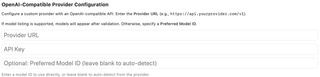
Enter the Provider URL, including the API version path where needed, and the provider's API Key. Endpoints that do not require authentication can use an empty key. Current builds may request explicit consent before sending credentials to a non-HTTPS endpoint.
Leave Preferred Model ID blank to discover models from the endpoint. If the provider cannot list models, enter an exact compatible model identifier instead.
Default Output Max Tokens

This caps the requested output length. 0 or an empty saved limit uses the model/provider default. Increase a positive limit when outputs are cut off, subject to the model's actual limits. The displayed 8192 is an example value.
The adjacent save button updates the limit on an already validated configuration without another network validation.
Validate, save, and remove

Validate & Save validates the endpoint and persists the configuration. With no preferred model, it fetches a nonempty model list. With a preferred model, it tests that model with a short completion request rather than relying on model discovery. That validation sends a small test prompt to the provider.
Content-Type header controls inclusion of that header in the saved custom-provider configuration. Delete Provider removes the custom configuration and its stored credential; it does not delete an account at the service.
After successful discovery, Available Models offers search and per-model enable controls, showing up to 20 matches with enabled models first. Previously enabled models are retained when they still exist in the refreshed catalog. A preferred model is stored separately from that enabled-model set.