Context Overview
The key to good AI responses is giving the right context - not too much, not too little. RepoPrompt gives you precise control over what context your AI sees.
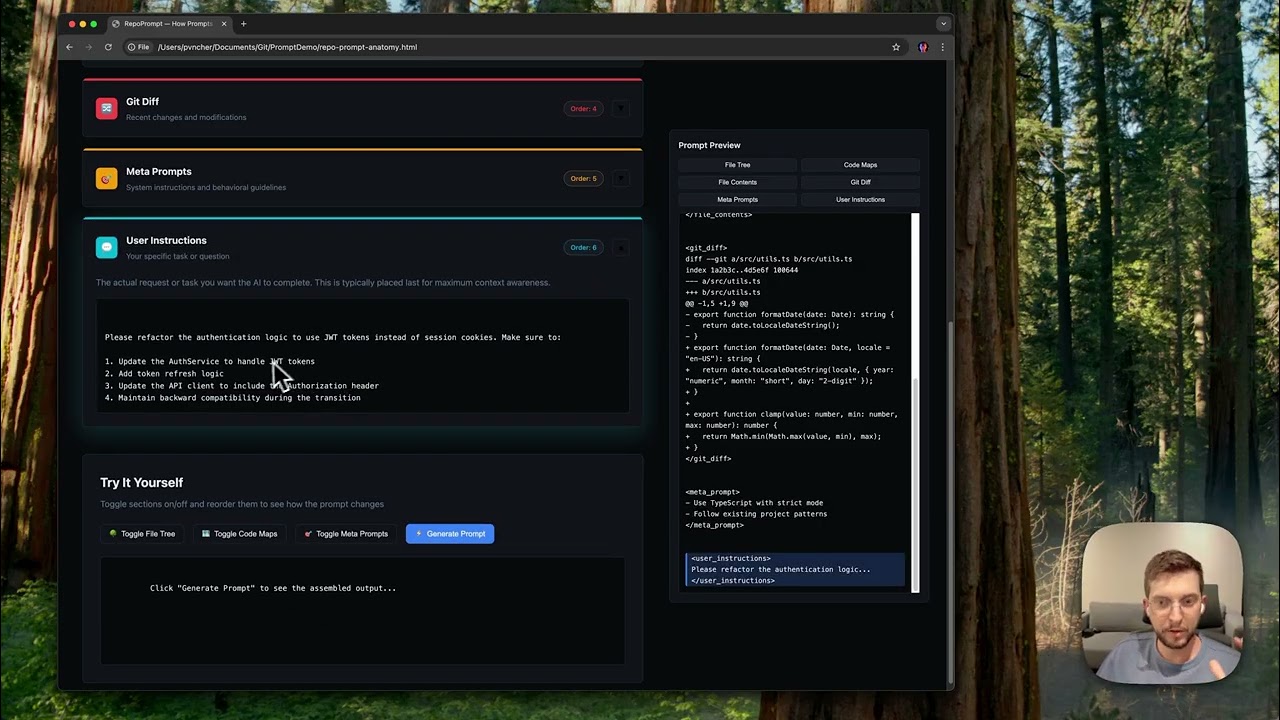 What is RepoPrompt for? Overview of context building fundamentals
The Anatomy of a RepoPrompt
Every prompt you create in RepoPrompt is assembled from several components:
- Your instructions: What you want the AI to do
- File tree: Project structure for navigation context
- Codemaps: Structural summaries of your code
- Selected files: Full content of files you're working with
- Slices: Specific line ranges from large files
Try the interactive Prompt Anatomy demo →
Multi-Root Workspaces
RepoPrompt supports opening multiple root folders in a single workspace. All features work across roots:
- Cross-project context: Select files from your codebase and a third-party library to evaluate integration
- Code + docs: Work with your code and documentation site together to improve docs
- Monorepos: Navigate related packages, shared libraries, and services in one view
- Context Builder: Discovers relevant files across all roots automatically
Add roots via File → Add Folder to Workspace or drag folders onto the app.
Context Building Workflow
There are two main approaches to building context:
Manual Selection
- Browse the file tree and click files to select them
- Use search to find specific files or content
- Adjust selection modes (Full, Codemap, Slices) per file
- Write your prompt and copy to AI
AI-Powered Discovery
- Open Context Builder and describe your task
- Let the AI agent explore and select relevant files
- Review and refine the selection
- Proceed to your chosen workflow
tip
Tip: For complex tasks, start with Context Builder to discover files, then manually refine the selection before proceeding.