MCP Server Overview
MCP Server: An IDE for AI Agents
What is MCP?
MCP (Model Context Protocol) is an open standard for AI tools to communicate with external services. RepoPrompt's MCP server exposes its capabilities — file selection, codemaps, Context Builder, chat, edits, workspace and tab lifecycle, app preferences, and Agent Mode session control — as tools that any MCP-compatible agent can use. The same tool surface is reachable two ways:
- Direct MCP — persistent connections for agents that natively speak MCP.
- rp-cli — ephemeral shell invocations for agents and humans that prefer a terminal.
Picking one is a shape choice, not a capability tradeoff. Anything you can do in the UI — switching workspaces, creating tabs, selecting files, running Context Builder, starting chats, applying edits, orchestrating Agent Mode runs, flipping allowlisted preferences — is reachable from either surface.
Quick Access: MCP Controls
Click the MCP Server indicator in the toolbar for quick access to all MCP settings. This is the primary control panel for MCP - no need to dig through preferences.
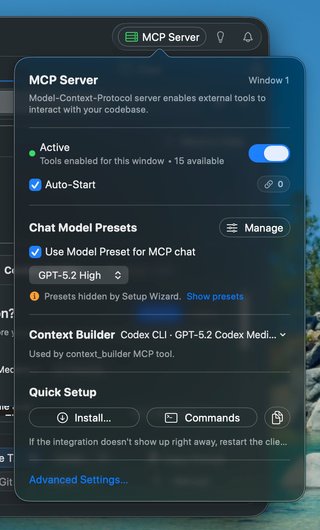
Key settings to configure:
- Auto-Start: Enable this so MCP is always available when you launch RepoPrompt
- Chat Model Presets: Choose which model handles
chat_sendrequests from external agents - Context Builder: Select the agent (Codex, Claude, Gemini) that powers
context_builder - Quick Setup: One-click install for Cursor, Claude Code, Codex CLI, and more
Showing 0 tools? If you just set up your client and it shows 0 available tools, the client cached the empty tool list before RepoPrompt was ready. Restart your client (Cursor, Claude Code, etc.) to pull the updated list.
RepoPrompt as an IDE for Agents
Think of RepoPrompt's MCP server as providing everything an AI agent needs to work effectively with code:
File Navigation
Browse file trees, search by path or content, read files with line ranges - agents can explore codebases just like developers do.
Code Intelligence
Access codemaps showing function signatures and type definitions - token-efficient structural understanding without reading entire files.
Context Building
Select files with full content, line slices, or codemap-only modes. Auto-codemap management adds dependency context automatically.
AI-Powered Discovery
Run Context Builder as an MCP tool - let a headless agent select relevant files within a token budget.
Pair Programming
Invoke RepoPrompt's built-in chat for planning, reviewing, and implementing changes with your configured models.
File Editing
Create, move, delete files. Apply search/replace edits or full rewrites with diff visualization and undo support.
Workspace Management
List, switch, and create workspaces. Manage compose tabs for parallel tasks. Full programmatic control.
Multi-Window Support
Press ⌘+N to open additional windows. MCP clients can target specific windows on demand, and agents can bind to specific tabs for isolated context.
Agent Control Plane
External clients can orchestrate Agent Mode sessions via agent_run (session-based run control) and agent_manage (session/workflow management). See the Tools Reference for details.
App Settings
Flip allowlisted RepoPrompt preferences — appearance, prompt packaging, edit-format defaults, preferred models, MCP auto-start, and the global Code Maps toggle — via the app_settings tool. See App Settings Tool.
Architecture Overview
The MCP server uses a secure, local-only architecture with UNIX socket transport:
Local Socket Transport:
External Client → rp-cli (stdio) → UNIX Socket → RepoPrompt App
All traffic stays local to your machine with no network ports exposed. UNIX sockets provide strong isolation - connections are user-specific and cannot be accessed by other users on the system.
Compatible Clients
- Claude Code - Anthropic's official CLI with full MCP support
- Cursor - AI-powered editor with MCP integration
- Codex CLI - OpenAI's CLI tool
- Any MCP Client - The protocol is open and standardized
Sibling: rp-cli
Prefer a shell, or running on an agent that doesn't natively speak MCP? The same tools are reachable from rp-cli, RepoPrompt's scriptable control surface. Drive workspaces, selections, context, chats, edits, Agent Mode runs, and app settings from Bash or any shell. See App Settings from the CLI for the CLI view of the same app_settings surface.
Quick Start: claude-rp
For the fastest way to use Claude Code with RepoPrompt, install the claude-rp wrapper from the MCP Server popover → Install → "claude-rp (Claude Code wrapper)".
This installs a simple command that launches Claude Code pre-configured to use RepoPrompt's MCP tools instead of Claude's built-in file operations. No global MCP configuration needed - just run claude-rp instead of claude.
Key Benefits
- Better Context: Agents get token-efficient codemaps and slices instead of dumping entire files
- Multi-Repository: Work across multiple project folders in a single workspace
- Visual Feedback: See what agents are doing in RepoPrompt's UI
- Human Oversight: Approve connections, review edits before applying
- Undo Support: File checkpoints let you restore previous states
Security Model
- All connections require explicit user approval (or allowlist)
- Only connections from the local machine are accepted (UNIX sockets are local-only)
- No network ports exposed - uses local UNIX sockets for communication
- Per-user isolation - socket directories are user-specific
- Individual tools can be enabled/disabled
- Only one window owns the MCP server at a time
Getting Started: Click the MCP Server button in the toolbar to enable the server, configure your models, and install in your preferred client. See the Setup Guide for step-by-step instructions.