Architectural Planning
For high-stakes architectural decisions, you can break out the planning step and use ChatGPT Pro's extended reasoning for the deepest analysis. This is the manual version of what /rp-build automates — useful when you want hands-on control over the planning phase or access to GPT-5.5 Pro's thinking time.
Where each model lives: GPT-5.5 Pro is a ChatGPT Pro (web) model used for this architectural planning flow. GPT-5.5 Low for implementation and GPT-5.5 High for in-app review are available only through Codex CLI. Neither is available as an OpenAI API or OpenRouter model.
For most tasks: The /rp-build and /rp-orchestrate workflows automate this entire pipeline. Use this manual approach when you want GPT-5.5 Pro's extended reasoning for particularly complex architectural decisions, or when you need human review of the plan before implementation.
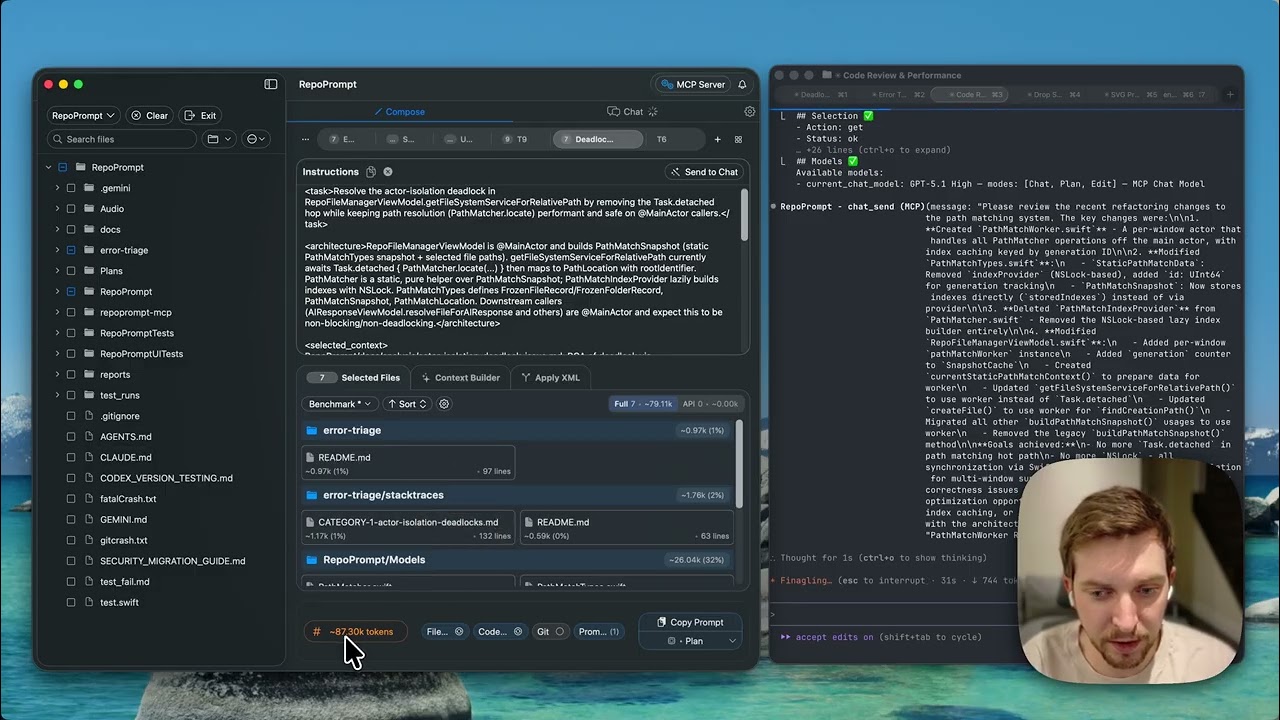 Fitting RepoPrompt into Agent Workflows Context Builder → Plan → Implementation → Review
Why Architectural Planning?
Coding agents — including /rp-build — use context-first planning to produce better results. But for the most consequential decisions, you may want to run the planning step yourself with a dedicated reasoning model:
- GPT-5.5 Pro's extended thinking time can surface insights that faster models miss
- You can review and refine the plan interactively before any code is written
- The planning conversation becomes a persistent reference you can return to
- Complex trade-offs benefit from a human-in-the-loop at the planning stage
The core principle — whether automated or manual — is the same:
- Context Builder gathers all relevant files first (discovery phase)
- The planning model receives complete context upfront
- It can reason about the entire affected codebase at once
- Plans are thorough and architecturally sound
The Workflow
- Run Context Builder with your task description
- Review the selection: Ensure all relevant files are included
- Switch to Plan preset: Select the "Plan" copy preset
- Copy and paste to GPT-5.5 Pro: Use ChatGPT's Pro plan for best results
- Get your architectural plan: GPT-5.5 Pro excels at breaking down architectures
- Refine if needed: Ask follow-up questions in the same chat
- Implement: Hand the plan to any Agent Mode provider (Claude Code, Codex CLI with GPT-5.5 Medium/High, Cursor, etc.), or run
/rp-buildwith the plan as input
Why GPT-5.5 Pro?
GPT-5.5 Pro has exceptional abilities for architectural planning:
- Extended reasoning: Can think for many minutes on complex problems
- Thorough analysis: Considers edge cases and implications
- Large context: Can process your entire relevant codebase
- Clear structure: Produces well-organized, actionable plans
Token Budget: The default 60k token budget is calibrated for GPT-5.5 Pro on ChatGPT's Pro plan. This is the upper limit before hitting errors when pasting into the web interface.
What Good Plans Include
An effective architectural plan should cover:
1. Clear Outcome Specification
- What the final product should do after changes
- Success criteria and expected behavior
- Edge cases to handle
2. Architectural Specification
- How new code should be structured
- Which parts of the codebase are affected
- What each component should do exactly
- Dependencies and relationships
3. Implementation Steps
- Ordered list of changes to make
- Clear, verifiable sub-tasks
- Dependencies between steps
Why PRDs Aren't Enough
Many plan modes focus on PRDs (Product Requirements Documents). The problem:
- PRDs describe what but not how
- Implementation details are left to the implementing model
- Agent orientation problems return during implementation
- No guidance on code structure or file organization
Architectural plans solve this by specifying implementation details upfront, so the implementing model encounters minimal ambiguity.
From Plan to Implementation
Once you have your architectural plan, hand it off for implementation:
- /rp-orchestrate: Takes the plan and delegates sub-tasks across multiple agents automatically
- /rp-build: Feed the plan as input for a single-agent automated build
- Claude Code: Paste the plan and let it implement step by step
- Codex CLI: Feed the plan as context for implementation
- Cursor / Cursor CLI: Use the plan to guide agentic edits
- RepoPrompt Chat: Use XML Pro Edit mode for direct implementation
The plan provides the architectural guidance that keeps implementation on track. Instead of discovering your codebase from scratch, the agent receives a complete implementation roadmap.
Review the Implementation
After the agent implements your plan, review the changes with one of these approaches:
Option 1: Automated Review with /rp-review
Run /rp-review to automatically review the implementation against your plan. Since Context Builder already selected the relevant files, the review has all the context needed for a thorough analysis.
- Verifies the implementation matches the plan
- Checks for edge cases or missing error handling
- Suggests tests or improvements
Option 2: GPT-5.5 Pro Review (Recommended for ChatGPT users)
If you used ChatGPT for planning, use the Diff Follow-up copy preset to request a review:
- The preset includes your prompt plus diffs of all changed files
- GPT-5.5 Pro sees exactly what the agent did in response to the plan it proposed
- Efficiently conveys changes without resending the entire codebase
- The planning model can validate implementation against its own architectural recommendations
Why Review Matters: The planning model has deep context about your architecture. Having it review the implementation catches misunderstandings and ensures the changes align with the intended design.
When to Use Architectural Planning
- New features: Significant additions to the codebase
- Major refactors: Restructuring existing code
- System redesign: Changing how components interact
- Complex bugs: Issues requiring architectural understanding
- Performance optimization: Changes affecting multiple systems
Example Use Cases
- "Add a caching layer to our API endpoints"
- "Refactor the authentication system to support OAuth"
- "Implement real-time notifications across the app"
- "Migrate from REST to GraphQL"
- "Add comprehensive error handling throughout the codebase"
Pro Tip: After getting your plan from GPT-5.5 Pro, review it carefully. If something seems off, ask follow-up questions in the same chat. The model has full context and can refine its recommendations.