Agent Models
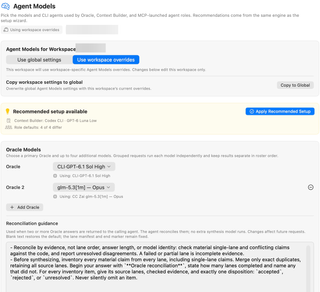
Choose the Oracle analysis model, the Context Builder agent and model, and model defaults for sub-agent roles such as Pair, Design, Explore, and Engineer.
Open Settings → Agent Mode → Agent Models. This page chooses the models used by Oracle, Context Builder, and MCP-launched agent roles. The model names and connected providers shown are examples, not fixed defaults.
Use the Models reference for the meaning of these model roles and shared selection concepts, and the provider directory for connection requirements. The sections below explain settings scope and controls.
Global settings and workspace overrides
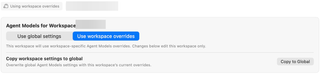
With a workspace open, choose where edits apply:
- Use global settings: this workspace inherits the global Agent Models profile, and changes below edit that profile.
- Use workspace overrides: changes below apply to this workspace's profile.
Copy to Workspace copies the current global profile and switches this workspace to overrides. When editing overrides, the corresponding Copy to Global action overwrites the global profile after confirmation, affecting other workspaces that inherit it. The scope chips at the top show the active profile and workspace.
Recommended setup

Recommendations come from the same engine as the setup wizard. Apply Recommended Setup applies the recommended configuration to the scope you are editing. Individual rows can also offer Apply when their current choice differs. If everything matches, the page reports that the models are up to date.
Oracle Models
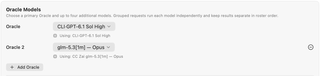
Choose a primary Oracle and up to four additional models. Add Oracle adds another entry; the minus control removes an additional entry. Grouped requests run each model independently and retain separate results in roster order.
Set Reconciliation guidance for the calling agent when multiple answers return. The calling agent reconciles those answers; this does not launch another synthesis model. Saved guidance affects future requests, and blank guidance restores the default. The response-lane manifest and end marker remain fixed.
For named configurations exposed to MCP clients, see Oracle Model Presets.
Re-prompt
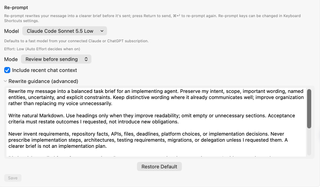
Re-prompt turns your draft message into a clearer task brief before sending it to the agent. Its settings follow the global or workspace scope selected at the top of this page.
- Model selects the model that rewrites the draft. The default uses a fast model from a connected Claude or ChatGPT subscription. See Providers & Models for model availability.
- Effort is Low unless Auto Effort chooses the level.
- Mode → Review before sending lets you inspect the rewritten draft before sending. Send automatically sends the completed rewrite without that review step.
- Include recent chat context supplies recent conversation context to help interpret the draft.
- Rewrite guidance (advanced) lets you customize the rewriting instructions. Restore Default loads the default guidance into the draft.
Choose Save to store changes. Guidance must fit within 16 KiB; an oversized draft is not truncated or saved. If settings or scope change while you edit, use Reload Current Settings before saving; this discards your draft.
While reviewing a rewrite, press Return to send it, Command+Return to rewrite again, or Shift+Command+O to send the original text. These shortcuts can be changed in Keyboard Shortcuts.
Context Builder Agent

Choose the CLI agent and model that discover files and build context for Oracle, plans, and reviews. If no suitable agent is connected, use Connect in CLI Providers first. Token budgets and prompt-enhancement behavior belong on Context Builder.
Sub-Agent Role Defaults
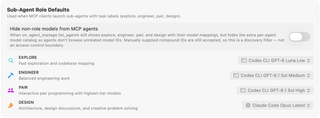
These mappings supply models when an MCP client launches an agent using a role label:
| Role | Intended work |
|---|---|
| Explore | Fast, read-only exploration and codebase mapping. |
| Engineer | Balanced engineering and implementation work. |
| Pair | Interactive pair programming with highest-tier models (default when model_id is omitted in agent_run op="start"). |
| Design | Architecture, design critique, and creative problem solving (produces Markdown design/review documents under docs/). |
Choose the provider/model from each row's menu. Reset All to Recommended appears when role defaults have overrides.
Hide non-role models from MCP agents limits model discovery: agent_manage still exposes role labels and their mappings but omits the extra per-agent model catalog. Explicit compound model identifiers remain accepted. This is not an access-control boundary. Model Router can separately route eligible role-based starts.
Advanced: synchronize built-in chat

Keep Built-in Chat Model synced with Oracle Model makes choosing an Oracle update the built-in chat model to match. Turn it off to choose the chat model independently. This does not make the chat model the same thing as a sub-agent role mapping.
Related settings

Use CLI Providers for connections, Agent Permissions for execution permissions, and Oracle Model Presets for named MCP Oracle configurations.