Agent Workflows
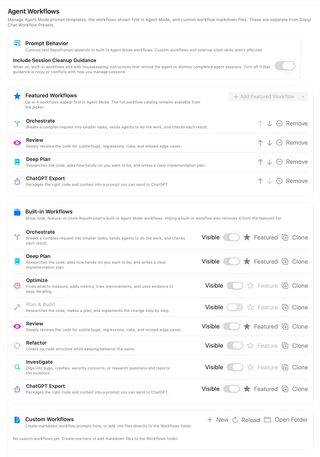
Manage the built-in workflows shown in Agent Mode, featured workflows, custom Markdown workflows, and cleanup guidance included with workflows.
Open Settings → Agent Mode → Agent Workflows. These are Agent Mode prompt templates, separate from Copy/Chat Workflow Presets. Select a workflow in Agent Mode before sending a task.
Prompt Behavior

Include Session Cleanup Guidance controls housekeeping instructions appended to built-in workflow templates, reminding the coding agent to dismiss completed sessions. Turn it off if that text conflicts with your session-management process. It does not change custom workflow templates or separately installed external workflow instructions, and it does not immediately dismiss sessions itself.
Featured Workflows
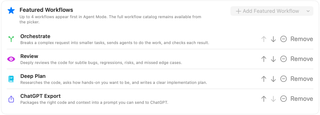
Up to four workflows appear first in Agent Mode. Add Featured Workflow chooses from eligible workflows; it is disabled when the list is full or there are no more available choices.
Use the up and down arrows to reorder this list. Remove removes a workflow from the featured list without deleting the workflow. The full visible catalog remains available in the workflow picker.
Built-in Workflows
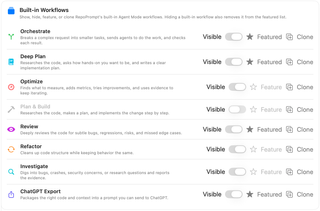
The built-in catalog includes:
| Workflow | Purpose |
|---|---|
| Orchestrate | Break work into smaller tasks, delegate, and check results. |
| Deep Plan | Research the code and produce an implementation plan. |
| Optimize | Measure, add metrics, and iterate on improvements. |
| Plan & Build | Plan and implement a change step by step. |
| Review | Look for bugs, regressions, risks, and missed cases. |
| Refactor | Improve structure while preserving behavior. |
| Investigate | Investigate problems or research questions and report evidence. |
| ChatGPT Export | Prepare code and context for a prompt to use in ChatGPT. |
Visible shows or hides a built-in workflow in the picker. Hiding it also removes it from Featured Workflows. Feature adds a visible workflow to the featured list, subject to the four-item limit. Clone creates an editable custom Markdown copy; it does not modify the shipped template.
Custom Workflows

Choose New, enter a name, and select Create to create a Markdown workflow. Alternatively, clone a built-in and edit the resulting file.
Open Folder opens the Workflows folder. You can add .md files there directly; Reload refreshes the catalog after external changes. Files can include optional frontmatter for a name, icon, accent color, tooltip, or description; otherwise the filename supplies the display name.
Custom rows provide their own management actions. Deleting a custom workflow asks for confirmation and removes its file from the Workflows folder; it cannot be undone from RepoPrompt.