Context Builder
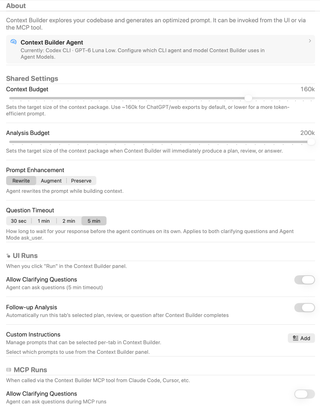
Configure context and analysis token budgets, prompt enhancement, question timeouts, and clarifying-question behavior. This page also manages custom instructions and distinguishes runs started in the interface from runs requested through MCP.
Open Settings → Agent Mode → Context Builder. Shared settings apply to context building from the interface and MCP, while each run type has its own clarifying-question switch. Screenshot selections are examples, not all factory defaults.
Context Builder Agent
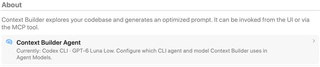
The Context Builder Agent row shows the current CLI agent and model. Open it to change those choices in Agent Models. This page controls context-building behavior rather than model selection.
Context Budget

Sets the target size of the selected context package for context-only runs, such as preparing a web export. The slider spans 10,000–200,000 tokens in 5,000-token steps; the default is 160,000.
A lower target can produce a smaller package. This is a context-selection budget, not an output-token limit or a guarantee about a model's supported context window.
Analysis Budget

Sets the context-package target when Context Builder will immediately produce a plan, review, or answer. The range is 40,000–200,000 tokens, in 5,000-token steps. The default is 120,000, even though this capture shows 200k.
Prompt Enhancement

| Mode | Result |
|---|---|
| Rewrite | Rewrites the prompt while building context; the default mode. |
| Augment | Keeps your instructions and appends relevant context. |
| Preserve | Updates file selection while leaving instructions unchanged. |
Question Timeout

Choose 30 seconds, 1 minute, 2 minutes, or 5 minutes. This is how long the agent waits for your answer before continuing on its own; it applies to clarifying questions and Agent Mode ask_user. It is not the total Context Builder run timeout.
UI Runs: clarifying questions

For runs started with Run in the Context Builder panel, Allow Clarifying Questions lets the agent ask you for more information. It is on by default. The description reflects the selected Question Timeout.
Turning this UI setting off also clears the MCP clarifying-question setting. Re-enabling UI questions does not automatically opt MCP runs back in.
UI Runs: follow-up analysis

Follow-up Analysis automatically runs the current tab's selected plan, review, or question after context building completes. It is off by default, though it is enabled in the capture. The follow-up type is selected per tab.
Custom Instructions

Add, or the saved-prompt count, opens the custom-instructions manager. Choose New, enter a title and instructions, then Save; the same manager edits existing prompts. The settings page previews up to three saved titles.
Saving a prompt here does not select it for every run. Select the instructions to use in the Context Builder panel for the current tab.
MCP Runs

The MCP Allow Clarifying Questions switch is separate and off by default. Enable it when you intend to watch RepoPrompt and answer questions from an external client's context_builder request. Questions use the shared timeout and remain disabled for inactive target workspaces.
MCP callers choose their requested response type through the tool. The UI-only Follow-up Analysis switch does not replace that request. See MCP Tools for the tool overview.