Updates
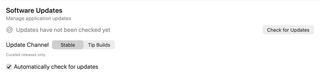
Manage software-update checks and choose the release channel used for RepoPrompt updates.
Open Settings → General → Updates. Status and available actions depend on the installed build and its update configuration.
Check for Updates

Choose Check for Updates to request an update check. The status distinguishes not checked yet, checking, a successful check with no newer eligible version, an available update, and a failed check. “Updates have not been checked yet” does not confirm that your installation is current.
If an update is available, the app offers installation or a manual download according to what that build supports. Checking alone is not confirmation that an update was installed.
Update Channel

| Channel | Releases offered |
|---|---|
| Stable | Curated releases; the default channel. |
| Tip Builds | Signed and notarized builds from the latest passing main branch. |
Switching from Tip Builds back to Stable takes effect with the next applicable stable release. To return immediately, reinstall Stable. Newer builds can also show Tip build history when that channel is selected.
For help choosing a channel, see What Is the Tip Version and Should I Use It?.
Automatic checks

Automatically check for updates enables passive checks when the updater is configured for this build. The implementation checks on startup and schedules checks at 12-hour intervals. Turning it off stops those passive checks; you can still use the manual button.
Passive checks discover releases. Installation remains a separate updater action.